How to share a Claude Code session with a teammate (and what actually transfers)
Claude Code has no one-command way to hand a local terminal session to a teammate. Cloud sessions on claude.ai/code can be shared as a link (Team visibility on Team and Enterprise, Public on Pro, Max and Ultra), /export turns any session into readable text, an artifact publishes the session's output as a page, and a handoff file written by Claude carries the state your teammate's own agent needs to continue.
"Sharing a session" can mean three different things: letting someone read the conversation, letting someone see what it produced, or letting someone pick the work up and continue. Claude Code covers the first two well. For the third there is no built-in handoff from a local terminal session to a teammate yet; an open feature request on the Claude Code repository asks for exactly that (anthropics/claude-code#98937, opened October 2, 2026). Until then, the reliable way is a written handoff.
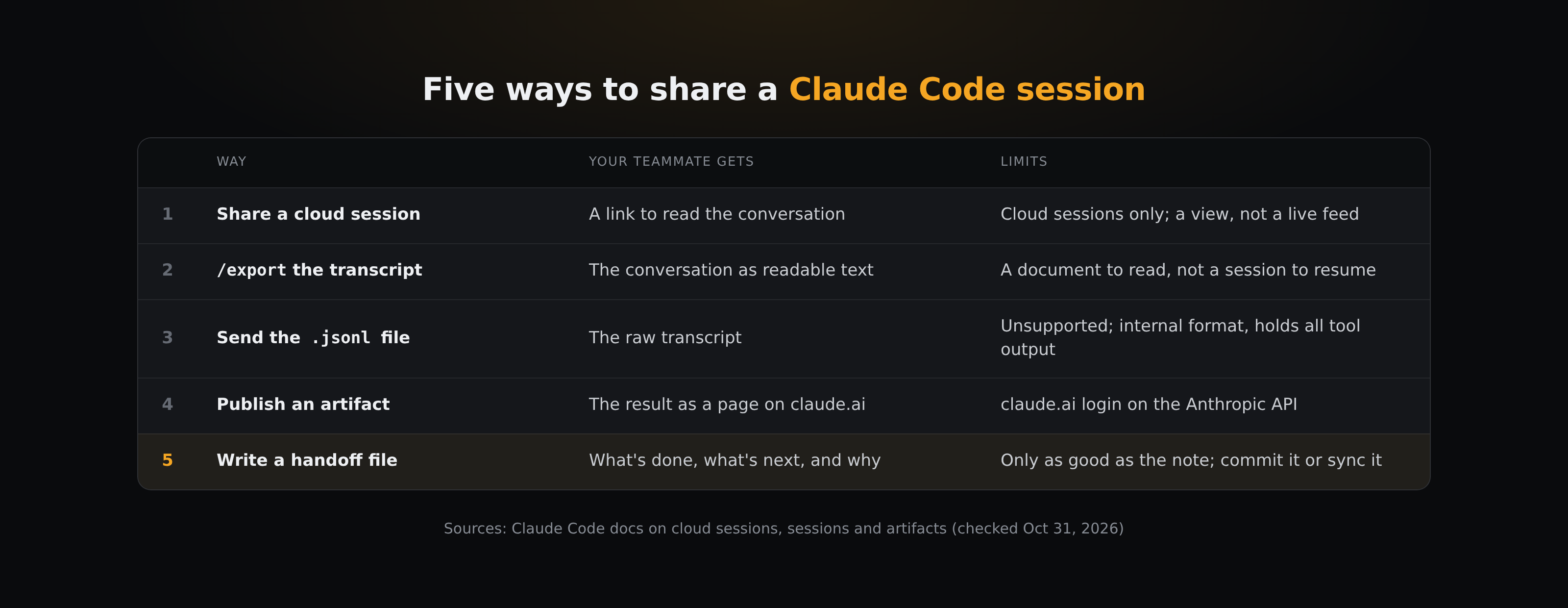
How do you share a cloud session?
Sessions that run in the cloud (claude.ai/code) can be shared from the sidebar by changing their visibility and sending the link (Claude Code docs).
- Team and Enterprise: visibility is Private or Team. Team makes the session visible to members of your claude.ai organization, and by default recipients must have access to the repository through their connected GitHub account.
- Pro, Max and Ultra: visibility is Private or Public. Public makes it visible to anyone signed in to claude.ai, and repository checks are off by default. Anthropic's docs warn that a session may contain code and credentials from private repositories, so read it before you share.
- Recipients see the latest state when they open the link, not a live view.
This works only for cloud sessions. From the terminal you can pull a cloud session down with --teleport, but you can't push an existing terminal session up; the Desktop app's Open in → Cloud menu moves a local session (not one running over SSH or in WSL) to the cloud with the conversation carried over as a summary.
Can you export a session to send it?
Run /export in any session to copy the conversation to the clipboard or save it as a plain-text file, with messages and tool output rendered as text. Pass a filename to skip the menu (Claude Code docs).
That is a good way to show someone how you got somewhere. It is a document for a person, though. Your teammate's agent can read it, but it starts a new session with a long transcript in its context, not your session.
Can a teammate resume your session from the transcript file?
Claude Code saves each session as JSONL under ~/.claude/projects/<project>/<session-id>.jsonl, and claude --resume <transcript-path> resumes a session from a .jsonl file at an absolute path. So copying the file to a teammate looks like a handoff.
Treat it as unsupported. The docs describe resuming your own sessions; they don't cover a transcript from someone else's machine, and they say the entry format is internal and changes between versions. The file also holds every tool output from the session, so anything Claude read is in it.
When is an artifact the right way to share?
If what your teammate needs is the result (a report, a dashboard, a migration checklist), ask Claude to publish it as an artifact. Claude Code writes the page and publishes it to a private URL on claude.ai, and you share it from the page header: with specific people or everyone in your organization on Team and Enterprise, or as a public link. People you share it with inside your organization can leave comments, and Claude can read and reply to them (Claude Code v2.1.221 or later).
Artifacts need a session signed in with a claude.ai account on the Anthropic API. Sessions using an API key or a gateway token, or running on Amazon Bedrock, Google Cloud's Agent Platform or Microsoft Foundry, can't publish them. On Team and Enterprise plans, public links are off until an owner enables them.
How do you write a handoff your teammate's agent can continue?
The method that doesn't depend on your Claude plan or model provider is to have Claude write down the state of the work before you stop, and put that file where your teammate's agent will read it.
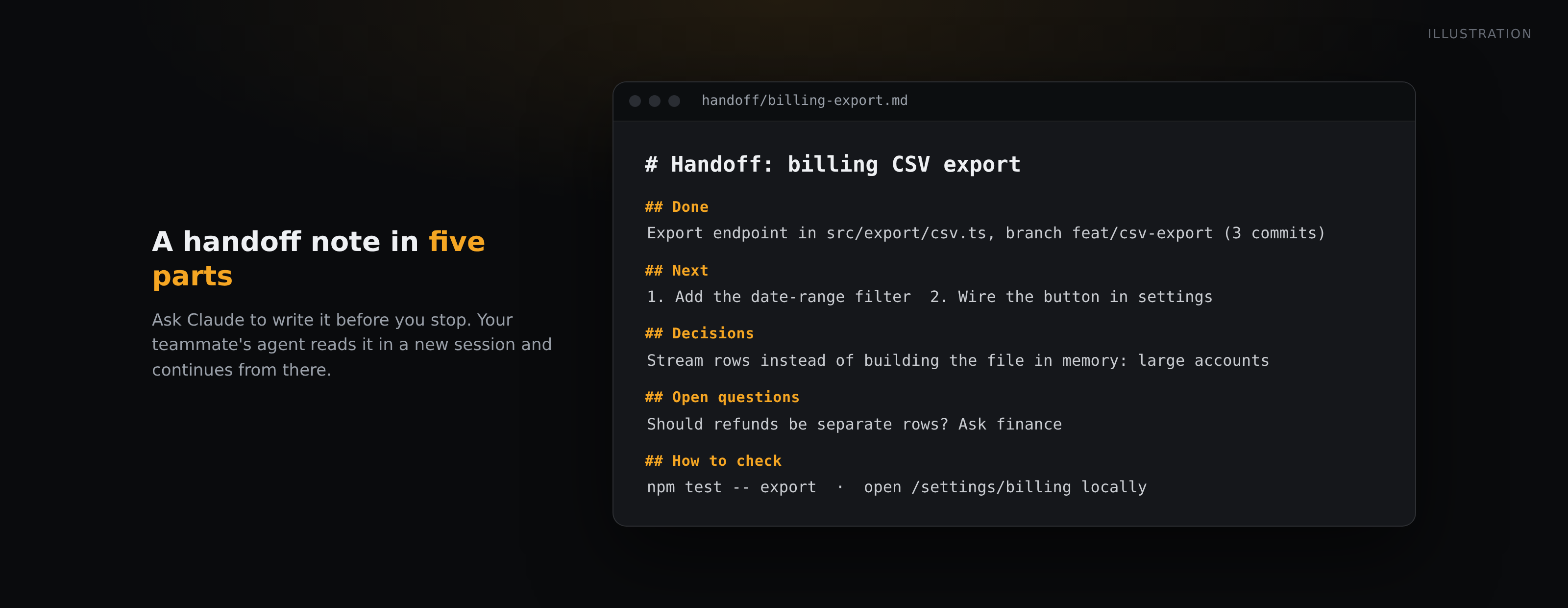
Ask for something like this at the end of the session:
Write a handoff to handoff/<task>.md for a teammate who will continue this in a new session: what's done (with file paths and commits), what's next, decisions made and why, open questions, and how to verify the current state.
A good handoff note has five parts:
- Done: what changed, with file paths, branches and commit hashes.
- Next: the next two or three steps, in order.
- Decisions: what you chose and why, so the next session doesn't reopen it.
- Open questions: what you didn't know, and who might.
- How to check: the command or page that shows the current state.
Then get the file to your teammate. Two common ways:
- Commit it to the repository with the work in progress. Your teammate pulls the branch and tells their agent to read the note. This fits handoffs about one codebase.
- Put it in a synced folder. This fits handoffs that shouldn't wait for a commit, or that aren't about a repository at all.
With BearDrive, the second option looks like this:
- Run
bdrive initin a folder (or ashared/subfolder of the project) and have your teammate join the same project. BearDrive is a folder sync tool for agent files with an open-source CLI (AGPL, macOS and Linux). - Ask Claude to write the handoff into that folder. The file is pushed to the hub after Claude writes it.
bdrive initregisters a hook that pulls the latest files when a message is sent, in Claude Code, Codex, Gemini CLI and Hermes (Codex hooks are experimental and have to be turned on once). The next time your teammate sends their agent a message in that folder, the handoff is already on their disk.- For someone who won't open a terminal,
bdrive share handoff/<task>.md --expires 24hmakes a public link that renders the markdown as a page and stops working after 24 hours. Anyone with the link can open it, so read the file first. - Teammates who open the file in the BearDrive web viewer can select text and comment on it.
bdrive comments --jsonlists open comments with the text they quote and, when it can still be found in your copy, its line, so the next session can work through them and close each withbdrive comments resolve <id> -m "what changed".
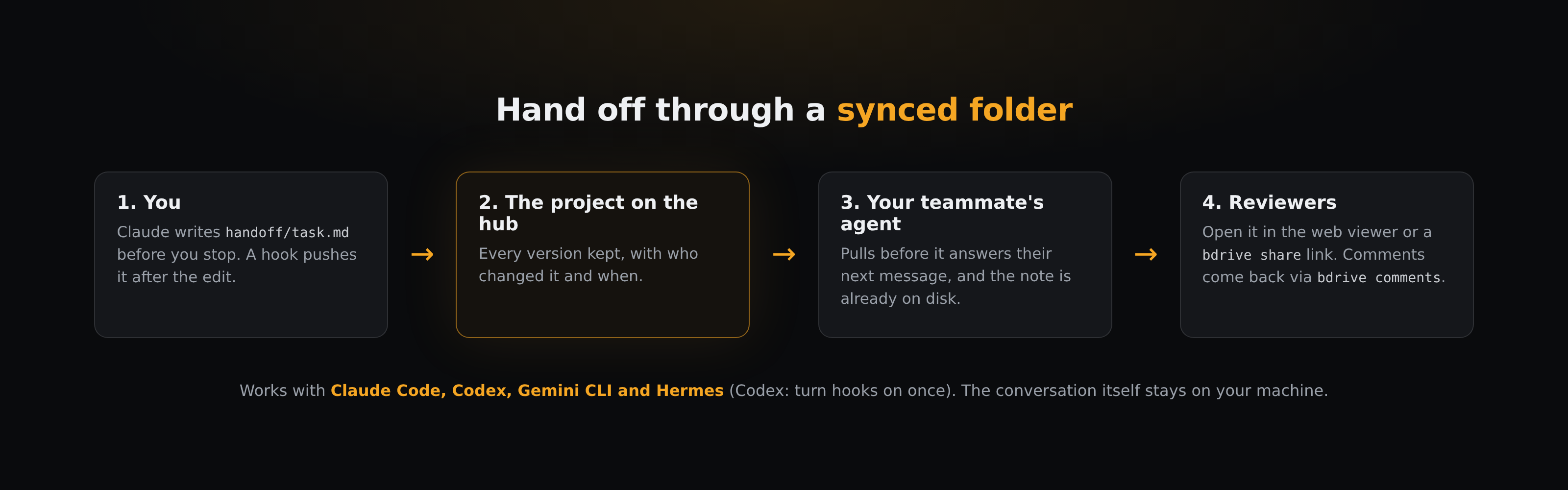
None of this moves your conversation. Your teammate gets a written handoff and the files it points to.
For a fuller setup (where each agent writes, how people review, what reaches a client), see How an agency team hands off AI agent work between people and agents.
Which way should you use?
- Your teammate should read how the work went, and the session ran in the cloud: share the cloud session.
- They should read how it went, and it ran locally:
/export. - They need the result, not the process: publish an artifact.
- They need to continue the work in their own agent: write a handoff file, and commit it or put it in a synced folder.
Questions
- Can a teammate resume my Claude Code session?
- Not with a supported feature today. claude --resume and --teleport are for your own sessions. Share a cloud session so they can read it, or write a handoff file so their agent can continue from it.
- Can I share a local terminal session as a link?
- Not directly. Shared links are for cloud sessions. In the Desktop app, Open in → Cloud moves a local session (except SSH or WSL sessions) to the cloud with the conversation carried over as a summary, and you can share it from there.
- Does /export include tool output?
- Yes. It renders messages and tool output as readable text, to the clipboard or a plain-text file.
- Does BearDrive sync my Claude Code conversations?
- No. It syncs the files in folders you choose and has no feature for moving a conversation so someone can resume it. bdrive init also refuses ~/.claude as a folder to sync, because it holds settings, credentials and session history.