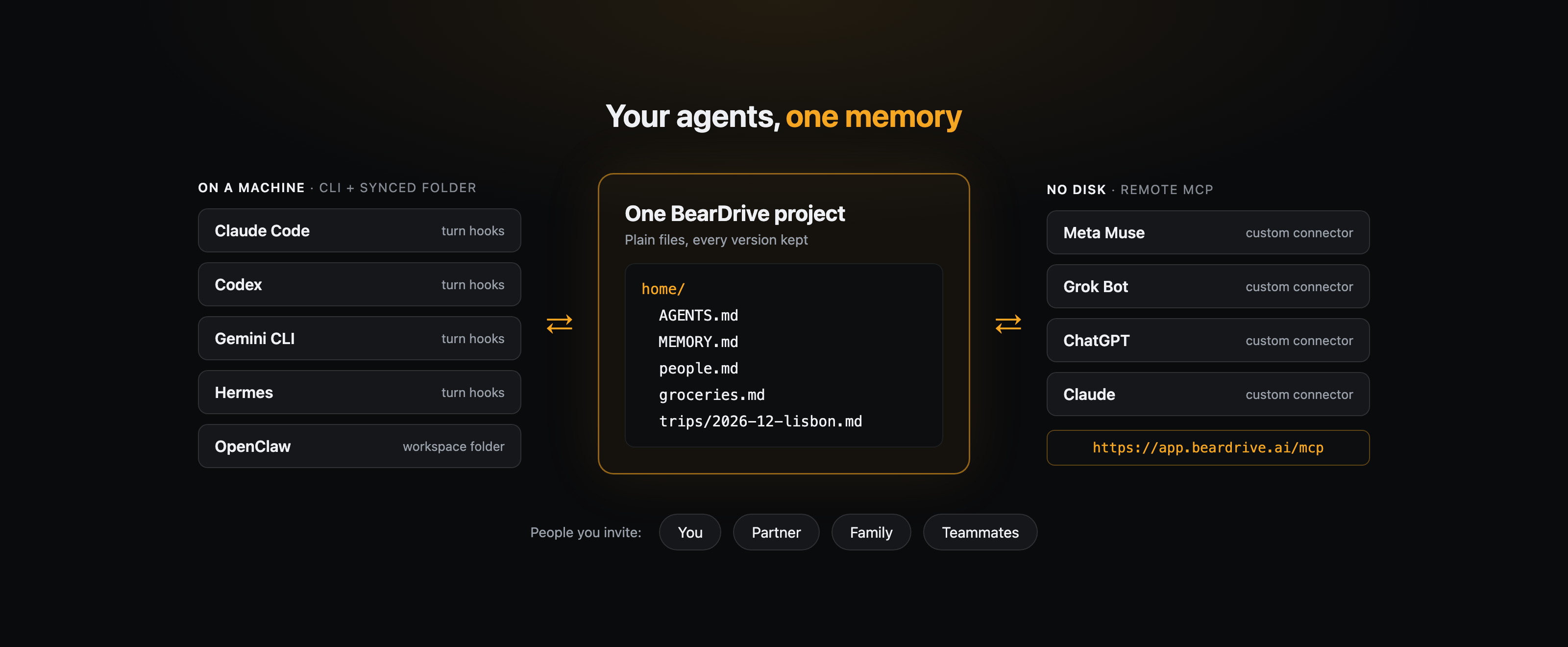
Most AI agents remember things in their own place: one agent's memory file, another app's chat history. BearDrive gives them one place instead. It is a folder of ordinary files that an app-based agent like Meta Muse or Grok Bot reaches over remote MCP, and an agent on your laptop reads from disk. Invite your partner, family or teammates to the same project and their agents read the same files too.
How do your agents connect?
There are two ways in, and one project can use both at once.
No disk: remote MCP
For agents that live in an app or a browser, such as Meta Muse, Grok Bot, ChatGPT and Claude. In the agent's connector settings, add a custom connector with this URL:
https://app.beardrive.ai/mcpSign in to BearDrive and pick projects on its consent screen. Nothing is pre-selected, and the agent gets exactly the projects you tick. It can list, read and search files and read a file's history there. In projects you can edit, it can also write, edit, move and delete files and restore an older version. Its changes appear in History under your name.
On a machine: the CLI and a synced folder
For agents that run on your computer. Install the CLI, sign in, and turn any folder into a project:
brew install runbear-io/tap/beardrive
bdrive login
cd ~/notes && bdrive init
Or skip the terminal and give your agent one line: Follow beardrive.ai/setup to set up BearDrive. Ask me which folder to sync.
bdrive init also registers turn hooks for Claude Code, Codex, Gemini CLI and Hermes: a blocking pull when you send a message, so the agent reads the latest files, and a push after it edits one. Any other program that reads and writes the folder, OpenClaw included, is covered by the background sync, which watches the folder and pushes changes shortly after they happen.
Which agents work with BearDrive?
| Agent | How it connects | What it can reach |
|---|---|---|
| Meta Muse | Remote MCP | The projects you tick on the consent screen |
| Grok Bot | Remote MCP | The projects you tick on the consent screen |
| ChatGPT | Remote MCP | The projects you tick on the consent screen |
| Claude | Remote MCP | The projects you tick on the consent screen |
| Claude Code | CLI + synced folder, turn hooks | Any synced folder, including CLAUDE.md, AGENTS.md and .claude/skills |
| Codex | CLI + synced folder, turn hooks | Any synced folder, including AGENTS.md |
| Gemini CLI | CLI + synced folder, turn hooks | Any synced folder |
| Hermes | CLI + synced folder, turn hooks | ~/.hermes/memories, not ~/.hermes itself |
| OpenClaw | CLI + synced folder, background sync | ~/.openclaw/workspace, not ~/.openclaw itself |
BearDrive refuses ~/.claude, ~/.codex, ~/.gemini and ~/.hermes as a synced folder, because those hold each agent's settings and credentials. Sync a subfolder such as ~/.claude/skills or ~/.hermes/memories instead. Any other client that speaks MCP can use the same URL.
Can my family share the same memory?
Yes. Invite people to your organization (Organization settings, then New invite, makes an expiring join link), and they can open your projects with their own agents. Each project has its own permissions under Project settings, People. Every member can write by default, so set a project's default to No access before you invite anyone to keep it to yourself (organization owners keep access to every project).
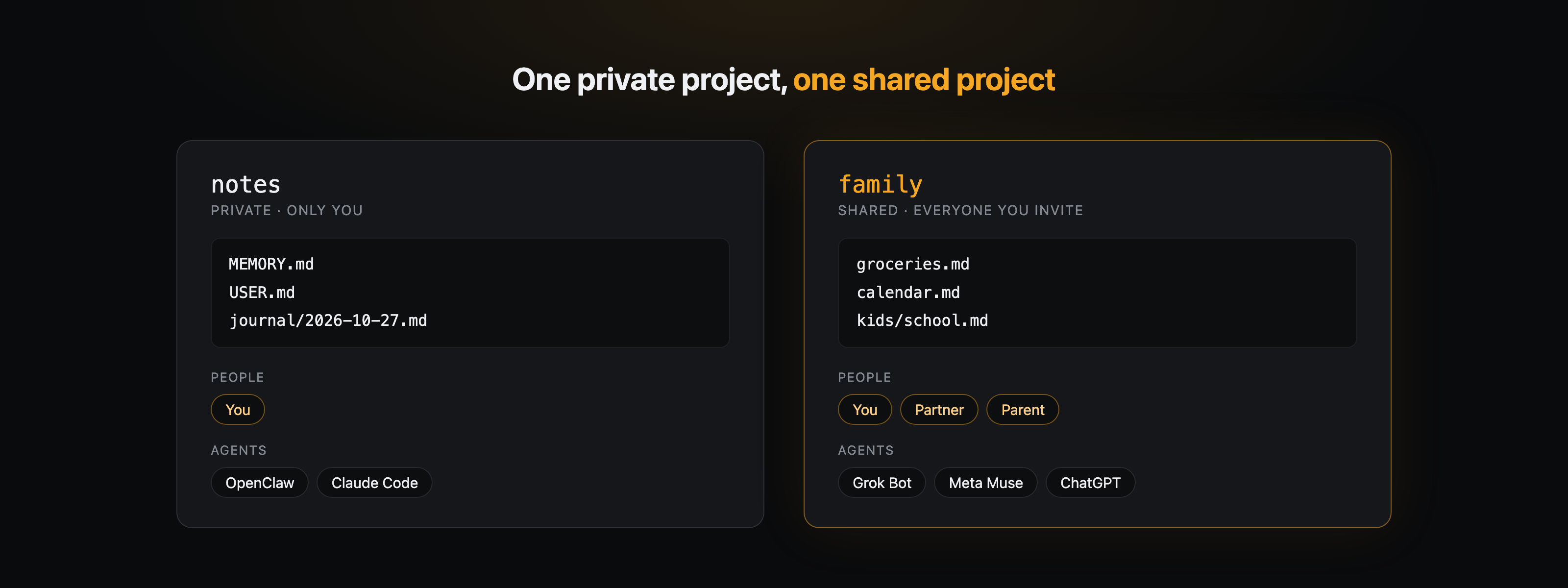
A memory file is personal. Keep two projects: a private one for your own agent memory and a shared one for what the household actually shares, like groceries, the calendar and trip plans. BearDrive is free during beta, with unlimited projects, members and history.
What if an agent overwrites a memory file?
Put the old version back. BearDrive keeps every version of every file, with who changed it, when, and from which device.
bdrive log -p MEMORY.md         # who changed it, when, from where
bdrive restore --list MEMORY.md # every version, current one marked
bdrive restore MEMORY.md        # put the previous version back
A restore is a new change, so nothing is erased and it syncs everywhere. Agents on remote MCP have the same undo through their history and restore tools. If two machines edit the same file at once, the later write wins and the other version is kept beside it as a conflict copy, so nothing is silently dropped.