Is there an MCP server for a shared folder with version history?
Yes, but not the official Filesystem server on its own: it reads and writes files on one machine and keeps no history. You can pair it with the Git MCP server and commit every change, use Dropbox's remote MCP server (it lists and restores file revisions), or connect to a hosted shared folder such as BearDrive, whose MCP endpoint has history and restore tools while the same project also syncs to disk with its CLI.
Short answer
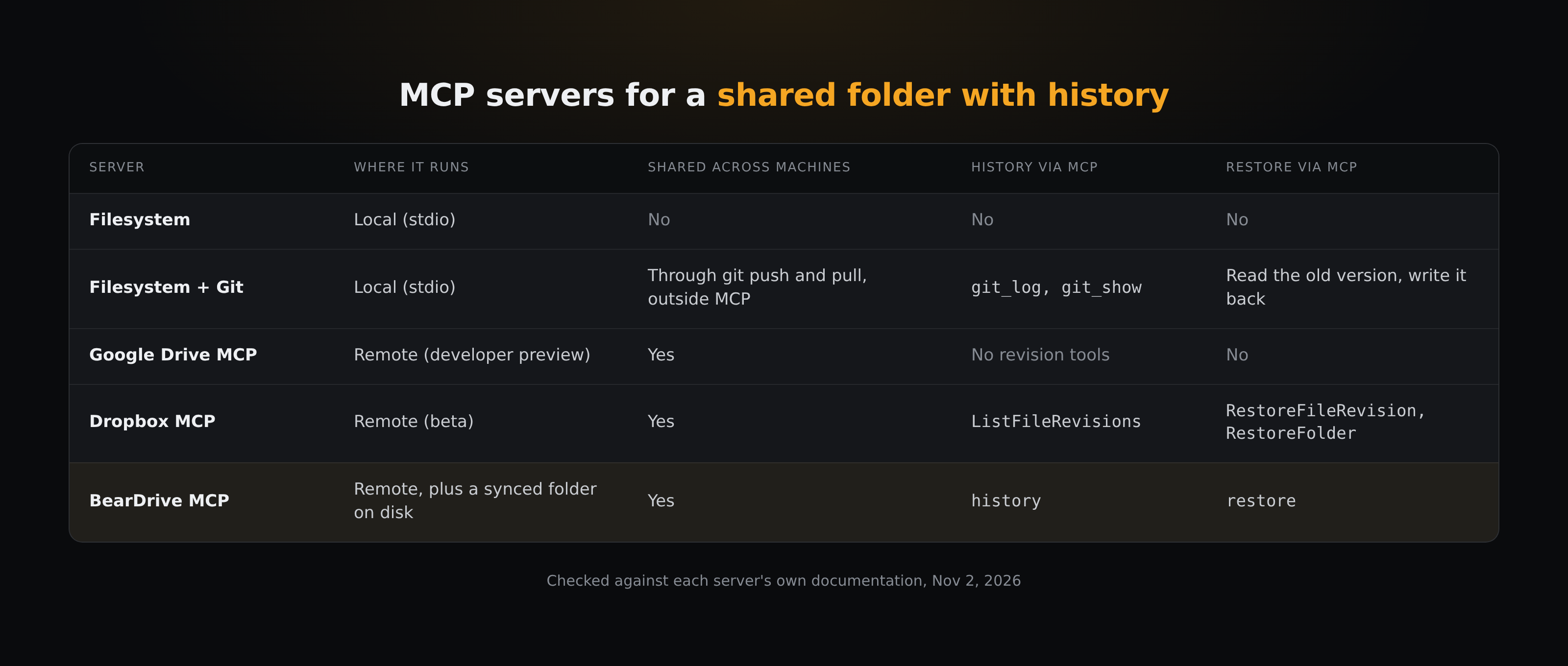
"A shared folder with version history" asks for three things at once: several assistants (or several people's assistants) see the same files, every change is kept, and an assistant can look back and undo. Each option below gives you some of those; few give you all three. Here is what each common option does, checked against its own documentation on November 2, 2026.
What does the official Filesystem MCP server do?
The reference Filesystem server (@modelcontextprotocol/server-filesystem) lets an assistant read, write, edit, move and search files inside the directories you pass on the command line. It is the server most people mean by "filesystem MCP".
Two things matter for sharing:
- It runs on one machine. Every server in the reference repository serves stdio (only the Everything test server also serves Streamable HTTP), so your MCP client starts it locally and talks to it over standard input (servers README). Assistants on other machines, or in a browser tab, can't reach it directly.
- It keeps no history.
write_fileoverwrites an existing file in place, and the README asks you to "exercise caution" with it. There is no tool to list or restore an earlier version.
So the Filesystem server is a good way to give one local assistant a folder. To share that folder, you need something underneath it that syncs, and to get history, something that records versions.
Can you add version history with the Git MCP server?
Yes. The reference Git server (mcp-server-git) gives the assistant git_add, git_commit, git_log, git_diff and git_show, so it can record a change, see what changed, and read a file as it was at an earlier commit (git_show with HEAD~1:path/to/file). Pointed at the same repository as the Filesystem server, that is a shared folder with history on one machine.
What it leaves to you:
- Commits happen only when the assistant (or you) commits. An edit made through the Filesystem server is not recorded until someone stages and commits it.
- There is no push or pull tool. The server's tool list covers status, diff, add, commit, reset, log, branch, checkout and show. Getting changes to a teammate's machine is a
git pushandgit pullyou run, or automate, outside MCP. - Undoing one file is two steps. The assistant reads the old content with
git_show, then writes it back with the Filesystem server. - It is stdio too, and the README says it "is currently in early development" and its tools may change.
If your team already lives in Git and the files are code or docs that belong in a repository, this is a solid setup.
Do Google Drive and Dropbox MCP servers keep version history?
Both companies now run their own remote MCP servers, which solves the "one machine" problem for the clients they support: Dropbox lists five ready-made clients (others can connect through a Dropbox app), and Google's server needs Developer Preview access and setup first.
- Google Drive. Google's Drive MCP server is part of the Google Workspace Developer Preview Program. Its reference page (last updated July 16, 2026) lists eight tools:
copy_file,create_file,download_file_content,get_file_metadata,get_file_permissions,list_recent_files,read_file_contentandsearch_files. None of them lists or restores revisions, so Drive's own version history isn't available to the assistant through this server. - Dropbox. Dropbox's remote MCP server at
https://mcp.dropbox.com/mcp(in beta, page updated September 30, 2026) does expose history:ListFileRevisionsreturns up to 100 revisions of a file,RestoreFileRevisionputs an older one back, andRestoreFolderrewinds a folder to an earlier point in time (Dropbox notes that recovering deleted files depends on your plan's recovery window). Dropbox lists Claude Code, Claude on the web, ChatGPT Codex, ChatGPT on the web and Cursor as supported clients. Its help page lists a tool that creates new files and none that edits an existing one (Paper docs aside).
If your team's files are already in Dropbox, its MCP server is the most direct answer to the question in the title.
How does BearDrive's MCP endpoint handle history?
BearDrive is a shared folder built for agents. Each project is a folder that syncs, through a hub, to each teammate's machine that connects it, and the hub also serves a remote MCP endpoint. On BearDrive Cloud that is https://app.beardrive.ai/mcp.
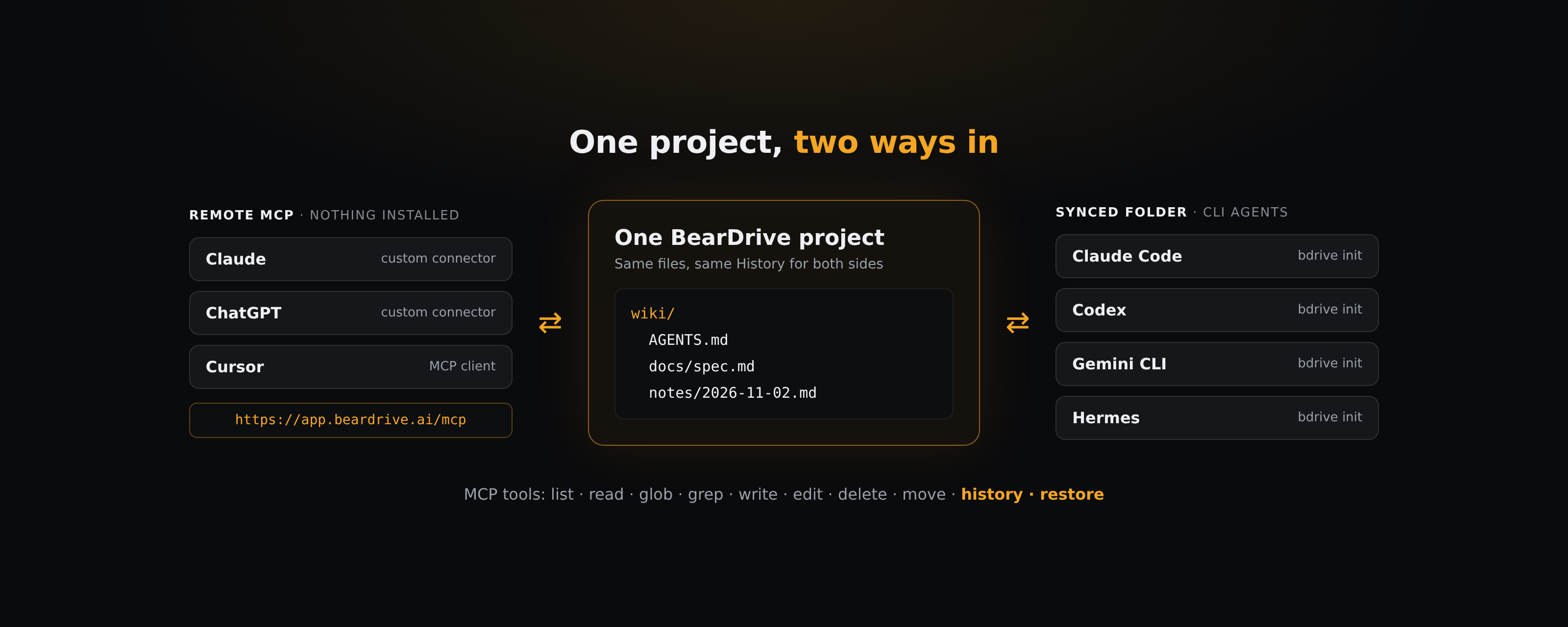
What an assistant gets over MCP (BearDrive MCP guide):
- The projects you pick. The client sends you to a consent screen listing your projects. Nothing is pre-selected; the assistant sees exactly the ones you tick, each as a top-level folder.
- File tools:
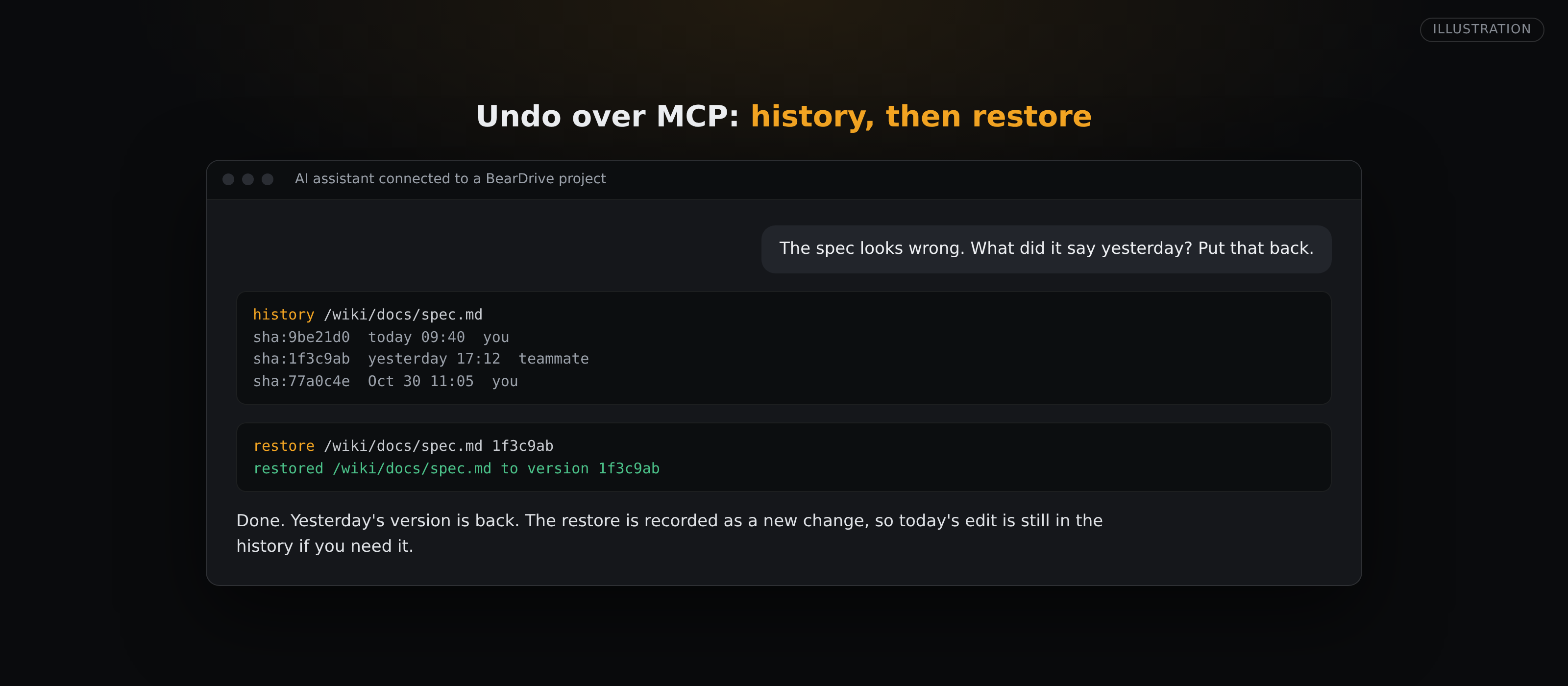
list,read,glob,grep,write,edit,deleteandmove. historyandrestore.historyreturns who changed a file, when, and the id of each past version.restoreputs a previous version back. "What did this file say yesterday? Put that back" is two calls. BearDrive keeps past versions of each file, sorestorecan bring one back (README).- A stale-write check.
writeandeditaccept the version id the assistant read. If it passes one and a teammate changed the file in between, the change is refused instead of overwriting theirs, so the assistant can re-read and try again. - Changes are attributed to you. Edits made over MCP show up in the project's History under your name, so teammates can see what an agent changed and undo it.
There is no shell and no mkdir (writing a path creates its folders). The difference from a drive-only server is the other door: CLI agents such as Claude Code, Codex, Gemini CLI and Hermes work in the same project as a normal folder on disk, synced with bdrive init, while browser assistants reach it over MCP. Both see the same files and the same history.
If you run your own hub (bdrive serve), MCP is off by default and is turned on with { "mcp": { "enabled": true } } in the hub config.
Which should you choose?
- One assistant, one machine, no history needed: the Filesystem server.
- Code or docs that belong in a repository: Filesystem plus Git, with pushes and pulls automated outside MCP.
- Files already in Dropbox: Dropbox's remote MCP server, which can list and restore revisions.
- Files already in Google Drive: Drive's MCP server gives access, but not revision history, as of its July 2026 reference.
- Several assistants and teammates on one folder, some in a terminal and some in a browser, with undo: a synced project with an MCP endpoint, such as BearDrive.
How do you connect an assistant to a BearDrive folder?
- Create a project at app.beardrive.ai, or turn an existing folder into one with
bdrive init. - In your assistant's connector settings, add a custom remote MCP server with the URL
https://app.beardrive.ai/mcp. - Sign in when the consent screen opens and tick the projects the assistant may use.
- Ask it to read a file, change it, and then call
historyon the same file. The change is listed with your name, andrestoreputs the earlier version back.
To disconnect, open Connected agents from the project menu, or run bdrive mcp list and bdrive mcp revoke <id>.
Questions
- Does the official Filesystem MCP server keep version history?
- No. It reads and writes files in the directories you allow, and write_file overwrites in place. Pair it with the Git MCP server, or use a server whose storage keeps versions.
- Can several AI assistants share one folder over MCP?
- Yes, if the server is remote and the folder lives somewhere they can all reach. The reference Filesystem server is stdio and local, so it serves the client on its own machine. Remote servers such as Dropbox's or BearDrive's can be connected from several clients and machines.
- Which MCP servers can restore an earlier version of a file?
- Of the options here, Dropbox's remote MCP server (RestoreFileRevision, RestoreFolder) and BearDrive's MCP endpoint (restore) have restore tools. With the Git server, the assistant reads the old version with git_show and writes it back. Google's Drive MCP server lists no revision tools as of its July 16, 2026 reference.
- What stops two assistants from overwriting each other's edits?
- It depends on the server. BearDrive's write and edit refuse a change when the assistant passes the version id it read and the file has moved on since; in the synced folder on disk, the later write wins and the other edit is kept beside it as a conflict copy. With Filesystem plus Git, nothing in the MCP tools stops it: an uncommitted overwrite is lost, and changes across machines are reconciled when you pull and merge.