How to share Agent Skills with your team (Claude Code, Codex, and claude.ai)
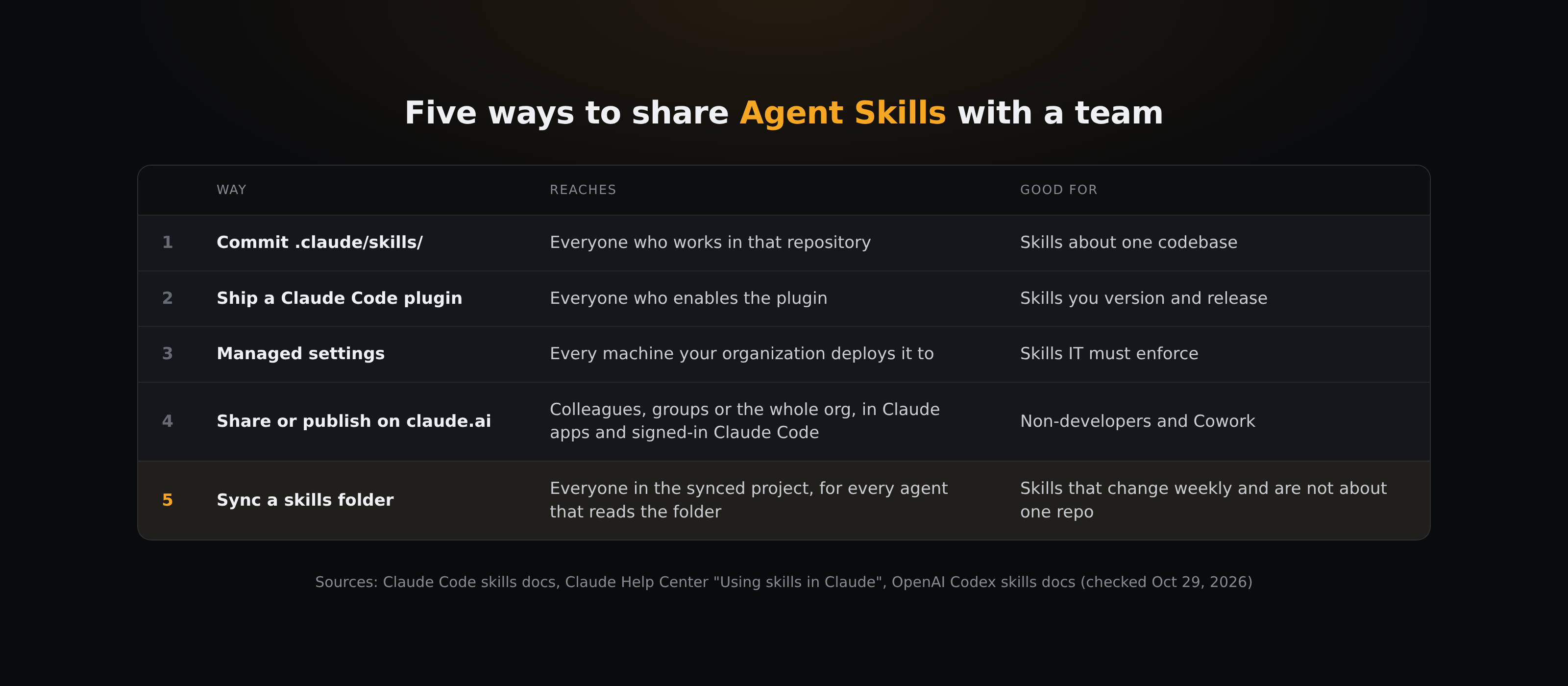
To share Agent Skills with a team, put each skill folder (a SKILL.md file plus anything it needs) where every teammate's agent looks: commit it to the repo's .claude/skills for one codebase, ship a Claude Code plugin for a versioned set, deploy it through managed settings when IT must enforce it, share or publish it on claude.ai for Claude apps and Cowork, or sync a skills folder for team skills that change often and are read by more than one agent.
A skill is a folder with a SKILL.md file. Sharing a skill means getting that folder onto every teammate's machine, or into their Claude account, in the place their agent looks. There are five common ways to do it, and most teams end up using two or three of them.
What changed for Agent Skills on October 22, 2026?
On October 22, 2026, Anthropic donated Agent Skills to the Agentic AI Foundation (AAIF) under the Linux Foundation, the same foundation Anthropic had already given the Model Context Protocol (MCP). The donation covers the Agent Skills name and logo, the GitHub organization and the agentskills.io domain. Anthropic says you can keep using the standard without joining the AAIF, and its proposed roadmap starts with versioned releases, a formal proposal process and security guidance.
Anthropic's post doesn't announce a format change. It describes a skill as a folder containing a SKILL.md file, plus any scripts or reference material it needs. For teams this matters in one practical way. More agents read the same SKILL.md format, so a skill your team writes is less tied to one tool. The folder each agent reads from is still different, though, and that is what decides how you share.
Where does each agent look for skills?
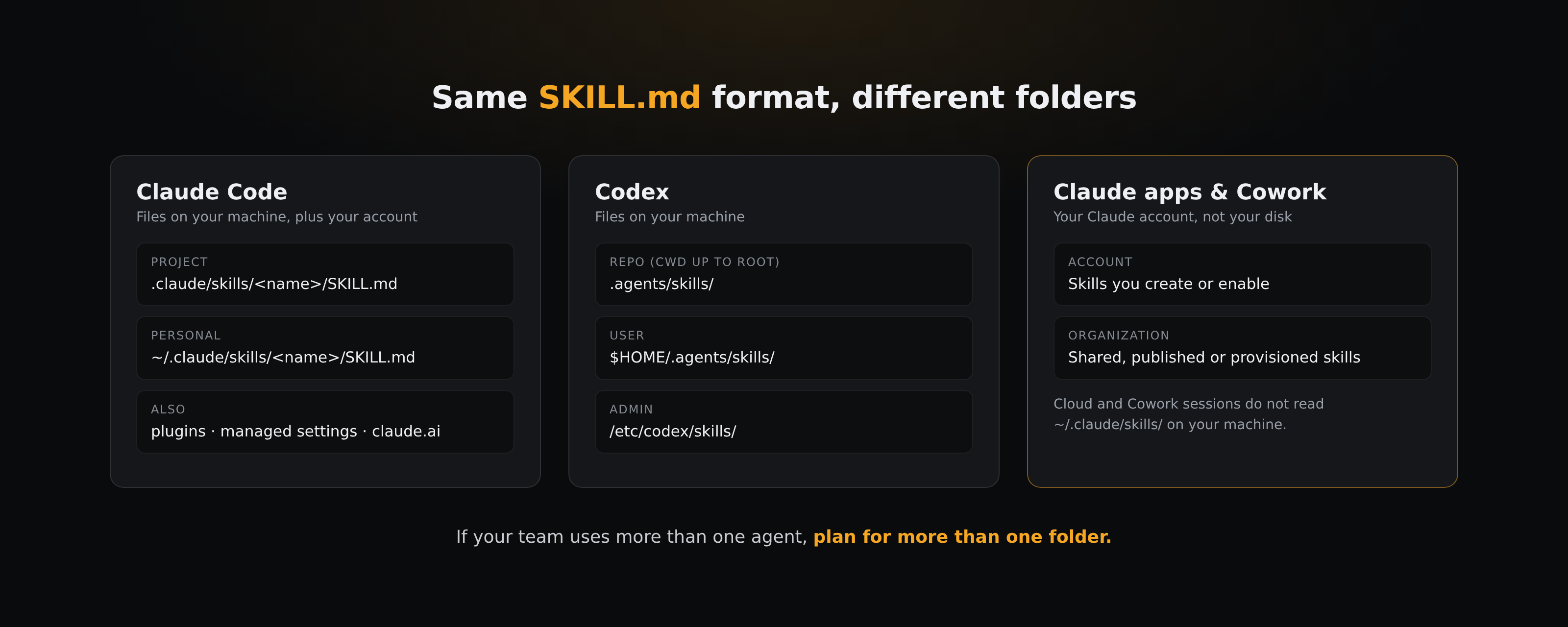
- Claude Code loads personal skills from
~/.claude/skills/<name>/SKILL.mdand project skills from.claude/skills/<name>/SKILL.md, plus plugin skills, managed (enterprise) skills, and skills enabled on your claude.ai account (Claude Code docs). - Codex scans
.agents/skillsin every directory from the current one up to the repository root, then$HOME/.agents/skills, then/etc/codex/skills(OpenAI docs). OpenAI's docs do not list.claude/skills. - Claude apps (claude.ai, Cowork) use skills enabled on your account or provided by your organization. Cloud and Cowork sessions do not read
~/.claude/skills/on your machine.
If your team uses more than one agent, plan for more than one folder.
How do you share a skill through the repository?
Put the skill in .claude/skills/ (or .agents/skills/ for Codex) and commit it. Claude Code's docs say it plainly: "Commit it so your team gets it too."
- Reaches: everyone who clones the repo and starts a local session inside it.
- Updates: teammates get a change when they pull. Claude Code watches skill folders and picks up an edited
SKILL.mdin the running session without a restart. - Stops at: the repository. A skill about how your team writes release notes or reviews client deliverables is not about one codebase, and copying it into every repo means several copies drift apart.
When is a plugin the right way to share skills?
A Claude Code plugin can carry skills at <plugin>/skills/<name>/SKILL.md. They load wherever the plugin is enabled, under a namespaced name (/plugin-name:skill-name), so they do not collide with someone's personal skill.
- Reaches: everyone who installs and enables the plugin.
- Good for: a stable set of skills you want to version and release.
- Stops at: quick edits. Each change is a release your teammates have to pick up, which is heavy for a skill you are still tuning.
How do managed settings deploy skills?
Organizations can deploy skills into Claude Code's managed settings directory (on Linux, /etc/claude-code/.claude/skills/<name>/). Codex has a similar admin location, /etc/codex/skills.
- Reaches: every machine your organization deploys it to.
- Precedence: in Claude Code, enterprise skills win over personal ones, and personal over project.
- Stops at: speed. Changes go through whoever manages your fleet.
How does skill sharing work on claude.ai?
On Team and Enterprise plans, you can share a custom skill with specific colleagues (Customize > Skills, then the skill's three-dot menu > Share), and Enterprise plans can also share with groups. Shared skills are view-only, and recipients get your updated version the next time they use it. To give a skill to the whole organization, publish it to the org, and an owner may review it first. Owners can also provision skills so they appear for every member (Claude Help Center).
The Share button only appears after an owner turns on sharing with the organization or with groups. Both toggles are off by default.
- Reaches: people in your Claude organization, in Claude apps, Cowork, cloud sessions, and Claude Code sessions signed in with that account (Claude Code v2.1.273 or later; not when Claude Code uses an API key or runs on Bedrock or another cloud provider). Recipients turn a shared skill on before it loads; a published skill is installed by each member unless the organization installs it by default.
- Stops at: your Claude account. The skill lives in Claude, not in a folder on disk, so agents that read skills from folders, such as Codex, need their own copy.
How do you share skills by syncing a folder?
The fifth option treats skills as ordinary files in a folder that every teammate's machine keeps in sync. Nobody exports or installs anything: when one person edits a SKILL.md, the file changes on everyone's disk.
With BearDrive, that looks like this:
- In the folder your agent starts sessions in, run
bdrive init --template skills. The template creates.claude/skills/with an example skill and anAGENTS.mdthat explains how the library is kept. - Teammates join the same project and start their sessions in that folder.
.claude/skills,.claude/commands,.claude/agents,AGENTS.mdandCLAUDE.mdsync like any other file. If your team also uses Codex, an.agents/skills/folder in the same project syncs the same way. - For a personal library that is not tied to one project, sync
~/.claude/skills. Do not sync~/.claudeitself: it holds your machine's settings, credentials and session history, andbdrive initrefuses it as a folder to sync.
bdrive init registers a hook in Claude Code, Codex, Gemini CLI and Hermes that pulls the latest files when you send a message. Codex needs its hooks turned on first (codex_hooks = true under [features] in ~/.codex/config.toml) and asks you to approve the hook once. After that, a teammate's new skill is on disk before your agent reads anything. Every change is kept with who made it and when, and bdrive restore brings back an earlier version.
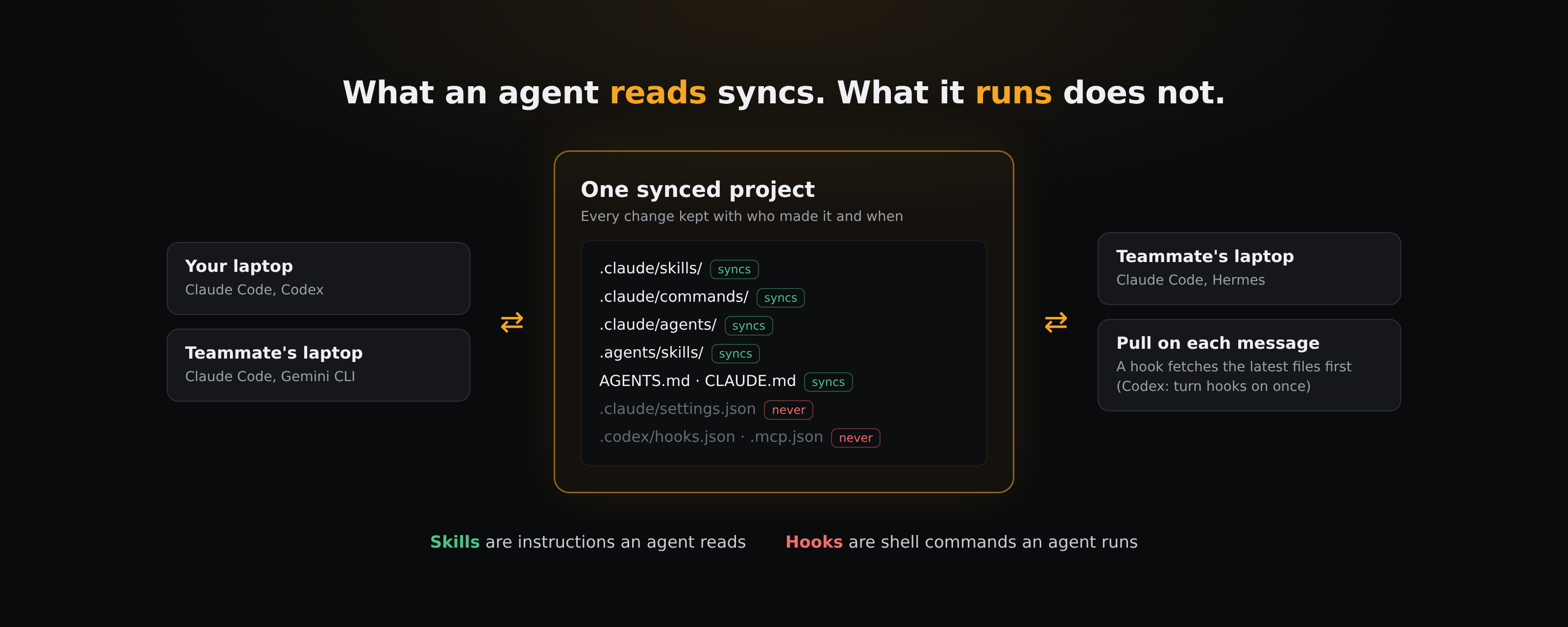
One line BearDrive does not cross: agent hook configuration (.claude/settings.json, .codex/hooks.json, .mcp.json and similar) never syncs. A hook is a shell command, and syncing one would run it on a teammate's machine. Skills are what an agent reads, so they sync. Hooks are what it runs, so they do not.
- Reaches: everyone in the synced project, for every agent that reads that folder: in sessions started in that folder, or in every repo when the project is synced at
~/.claude/skills($HOME/.agents/skillsfor Codex). - Good for: skills that change often and are about how the team works, not about one codebase.
- Stops at: Claude apps. A synced folder is on disk, so claude.ai, Cowork and cloud sessions do not see it. Use claude.ai sharing for those.
The same folder can hold more than skills. If your agents also hand finished files to each other and to teammates, see how to share context between your team's AI agents and sharing agent output with your team.
Which way should your team use?
- The skill is about one codebase: commit it to the repo.
- You want a versioned set that everyone opts into: ship a plugin.
- IT must enforce it on every machine: managed settings.
- Your team works mostly in Claude apps or Cowork: claude.ai sharing.
- The skill is about how your team works, changes every week, and is read by more than one agent: sync the folder.
Many teams mix them: codebase skills in the repo, team skills in a synced folder, and a few published on claude.ai for people who never open a terminal.
What keeps a shared skill library useful?
- One skill per job. Before adding a skill, read the existing ones. Two skills that both claim the same job is how an agent starts picking the wrong one.
- Write the trigger into the description. Agents first read only each skill's name and description, and load the full
SKILL.mdwhen a task matches. With a vague description, the agent may not load the skill when it should. - Watch for name collisions. In Claude Code, a personal skill overrides a project skill with the same name. If a teammate says the shared skill "does nothing", check
~/.claude/skills/for a local copy. - No secrets in skills. Every teammate's agent reads the file. Keep tokens and keys out of
SKILL.mdand the scripts beside it.
Questions
- Did the AAIF donation change the SKILL.md format?
- Anthropic's October 22, 2026 post doesn't announce a format change. It describes a skill as a folder with a SKILL.md file, and its proposed roadmap adds versioned releases and a formal proposal process for future changes.
- Can Codex use skills from .claude/skills?
- OpenAI's Codex docs list .agents/skills (in the repo and in $HOME) and /etc/codex/skills, not .claude/skills. Keep a copy in .agents/skills, or link to it, if your team uses both.
- Do claude.ai skills reach Claude Code?
- Yes, in terminal sessions signed in with that claude.ai account, on Claude Code v2.1.273 or later. It does not apply when Claude Code uses an API key or runs on Bedrock or another cloud provider. Claude Code checks for changes about every 10 minutes while you work.
- Can I sync my whole ~/.claude folder with BearDrive?
- No, on purpose. It holds machine-specific settings, credentials and session history, so bdrive init refuses it. Sync ~/.claude/skills instead.